Implementing Advanced Agentic Reasoning: A Technical Deep Dive into ReAct and Plan-and-Execute Patterns with LangGraph
Overview
Modern Large Language Models (LLMs) excel at language-centric tasks, but solving complex problems requires a robust autonomous agents architecture. To enable autonomous reasoning systems to strategize and interact with tools, developers must implement sophisticated chain-of-thought reasoning. The primary technical challenge lies in creating a framework that can dynamically plan, execute, handle failures, and self-correct—moving beyond simple LLM chains toward the dynamic, stateful graphs that define modern cognitive architectures AI.
This technical deep dive explores two powerful agentic reasoning patterns: ReAct (Reasoning and Acting) and Plan-and-Execute. We will dissect the architectural principles of each and demonstrate their practical implementation using LangGraph, a library for building stateful, multi-actor applications with LLMs. This guide covers the design, implementation, and optimization of these patterns, addressing common challenges such as preventing reasoning loops and implementing backtracking. Prerequisites for this guide include proficiency in Python 3.10+, an understanding of LLM concepts and APIs (e.g., OpenAI), and familiarity with the basics of the LangChain library. Readers will learn to construct production-ready agentic systems capable of tackling complex, real-world problems.
Core Concepts: Evolving Towards Advanced Cognitive Architectures AI
Before implementing advanced agents, it is crucial to understand the architectural evolution from simple, linear LLM calls to the stateful graphs that enable a complex AI decision-making process. This progression addresses the inherent limitations of stateless, one-shot inference when applied to dynamic problem-solving.
The Limitations of Linear Chains in the AI Decision-Making Process
Early autonomous agents architecture often relied on linear sequences of operations, commonly known as chains. In this model, an input passes through a predefined series of steps—for example, a prompt, an LLM call, and an output parser. While effective for simple, deterministic workflows, this linear approach fails when confronted with problems that require iteration, dynamic tool selection, or error recovery. A linear chain cannot easily loop or modify its plan midway through execution, making it unsuitable for tasks that require a dynamic AI decision-making process where the solution path is not known in advance.
The ReAct Pattern: A Foundation for AI Chain of Thought
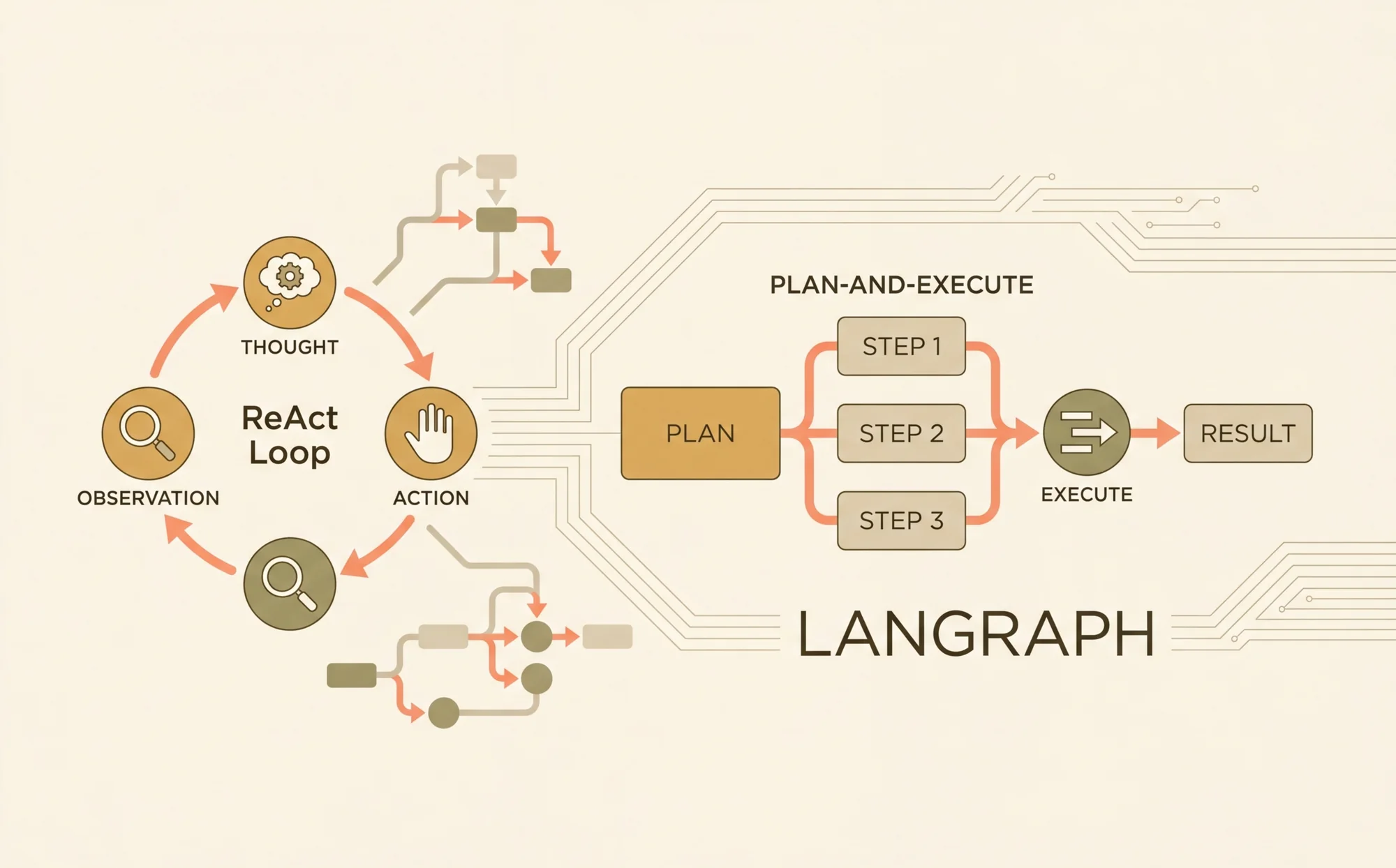
The ReAct pattern, introduced by Yao et al. in their 2022 paper, "ReAct: Synergizing Reasoning and Acting in Language Models," provides a more dynamic alternative. It structures an agent's workflow as an iterative loop of Thought -> Action -> Observation, a core tenet of modern AI reasoning models.
- Thought: The LLM analyzes the current problem and its progress, then engages in chain-of-thought reasoning to determine the next best step.
- Action: Based on its thought process, the LLM decides to invoke a specific tool (e.g., a web search, a database query) with certain parameters.
- Observation: The agent executes the action and receives a result (the observation), which is fed back into the context for the next reasoning cycle.
This cyclical process allows the agent to build context incrementally, correct mistakes, and dynamically adjust its strategy. The original ReAct paper demonstrated significant performance gains on tasks requiring deep chain-of-thought reasoning, like HotpotQA. LangGraph's state machine paradigm is exceptionally well-suited to implementing this pattern, as the loop can be modeled as a graph with nodes for reasoning and action, connected by conditional edges.
The Plan-and-Execute Pattern: Structuring the AI Decision-Making Process
For problems that benefit from high-level strategic planning, the Plan-and-Execute pattern offers a more structured approach. This pattern bifurcates the agent's responsibilities into two distinct phases, creating a more deliberate AI decision-making process:
- Planner: An LLM first analyzes the user's request and decomposes it into a sequence of discrete, actionable steps. This plan is generated upfront before any execution begins.
- Executor: A separate agent (or a different mode of the same agent) iterates through the steps of the plan, executing each one sequentially. The executor focuses solely on the current step, using the results of previous steps as context.
This separation of concerns is powerful for building sophisticated autonomous reasoning systems. It often involves using different AI reasoning models or prompts for planning and execution, allowing for model specialization (Fact 3). For instance, a highly capable model like GPT-4 can be used for strategic planning, while a faster, more cost-effective model can handle the execution of each well-defined step. This pattern excels at tasks requiring long-term coherence, where a clear, multi-step strategy is essential for success.
Architecting an Autonomous Agents Architecture with LangGraph
LangGraph provides the foundational components to build these complex reasoning patterns. It extends the LangChain Expression Language by enabling the creation of cyclical graphs, which are essential for emergent AI behavior. LangGraph represents agent workflows as a state graph, where nodes are functions and edges are conditional transitions that direct the flow of logic (Fact 2).
LangGraph Fundamentals: State, Nodes, and Edges
The core components of a LangGraph-based cognitive architectures AI are:
- State: A central object, typically a Python
TypedDict, that is passed between all nodes in the graph. It accumulates data throughout the workflow, such as the initial input, intermediate observations, and conversation history. The state must be serializable. - Nodes: Python functions or other callables that represent a unit of work. A node receives the current state as input and returns an updated state dictionary. Nodes can perform various tasks, such as calling an LLM, executing a tool, or performing data transformation.
- Edges: Connections between nodes that define the flow of control. A standard edge directs execution from one node to the next. A conditional edge uses a function to inspect the current state and dynamically route execution to one of several possible next nodes, enabling the branching logic critical for an advanced AI decision-making process.
System Setup and Dependencies
To begin, ensure your Python environment is correctly configured. The following commands install the necessary libraries for building and tracing LangGraph agents.
# Install core libraries for LangGraph, OpenAI integration, and common toolspip install langgraph langchain langchain-openai beautifulsoup4 duckduckgo-search# For tracing and debugging with LangSmithpip install langsmith
You must also configure your environment variables with the required API keys. Tracing with LangSmith is highly recommended for debugging the complex, non-linear execution paths common in autonomous agents architecture.
1# Set your OpenAI API key2export OPENAI_API_KEY="sk-..."34# Configure LangSmith for tracing (optional but recommended)5export LANGCHAIN_TRACING_V2="true"6export LANGCHAIN_API_KEY="ls__..."
Implementation Guide: Building a ReAct Agent for Autonomous Reasoning
We will now construct a ReAct agent from scratch using LangGraph. This agent will be capable of using a web search tool to answer questions, forming a basic autonomous reasoning system.
1. Defining the Agent State
The state is the memory of our agent. We define a TypedDict that includes the input query and a list of messages to maintain the conversation history, which is crucial for the ReAct loop's AI chain of thought.
1from typing import TypedDict, Annotated, Sequence2from langchain_core.messages import BaseMessage3import operator45# Define the state dictionary for our graph6class AgentState(TypedDict):7 # The list of messages accumulates over time8 messages: Annotated[Sequence[BaseMessage], operator.add]
2. Implementing Tools for Action
Tools are the functions an agent can execute. Here, we create a simple web search tool using the DuckDuckGoSearchRun utility and the @tool decorator, which makes the function easily discoverable by the agent.
1from langchain_core.tools import tool2from langchain_community.tools import DuckDuckGoSearchRun34# Instantiate the search tool5search_tool = DuckDuckGoSearchRun()67@tool8def web_search(query: str) -> str:9 """10 Executes a web search for the given query and returns the results.11 """12 return search_tool.run(query)1314# A list of all tools the agent can use15tools = [web_search]
3. Constructing the Graph Nodes
Our ReAct agent requires two primary nodes: one to call the model for reasoning (call_model) and another to execute the chosen tool (call_tool).
1from langchain_openai import ChatOpenAI2from langchain_core.messages import HumanMessage, ToolMessage34# The model node: responsible for the "Thought" part of the loop5def call_model(state: AgentState):6 messages = state['messages']7 # The model decides whether to respond to the user or use a tool8 response = model.invoke(messages)9 return {"messages": [response]}1011# The tool node: responsible for the "Action" part of the loop12def call_tool(state: AgentState):13 last_message = state['messages'][-1]14 # Check for tool calls in the last message15 if last_message.tool_calls:16 tool_call = last_message.tool_calls[0]17 tool_name = tool_call['name']1819 # Find the corresponding tool to execute20 action = next((t for t in tools if t.name == tool_name), None)21 if not action:22 raise ValueError(f"Tool {tool_name} not found.")2324 # Execute the tool and get the observation25 result = action.invoke(tool_call['args'])2627 # Return a ToolMessage with the result to continue the loop28 tool_message = ToolMessage(content=str(result), tool_call_id=tool_call['id'])29 return {"messages": [tool_message]}30 return {} # No tool call, do nothing
4. Defining Conditional Edges for Reasoning
The conditional edge is the brain of the ReAct agent. It inspects the last message from the model and dictates the AI decision-making process: execute a tool if one was requested, or finish if the model provided a final answer.
1from langchain_core.messages import AIMessage23def should_continue(state: AgentState) -> str:4 """5 Determines the next step based on the LLM's last response.6 """7 last_message = state['messages'][-1]8 # If the LLM made a tool call, route to the tool execution node9 if last_message.tool_calls:10 return "continue"11 # Otherwise, the model has responded, so we can finish12 return "end"
5. Compiling and Running the Graph
Finally, we assemble the nodes and edges into a StateGraph, compile it, and run it.
1from langgraph.graph import StateGraph, END23# Initialize the model and bind the tools4model = ChatOpenAI(model="gpt-4-turbo-preview", temperature=0).bind_tools(tools)56# Define the graph7workflow = StateGraph(AgentState)89# Add the nodes10workflow.add_node("agent", call_model)11workflow.add_node("action", call_tool)1213# Set the entry point14workflow.set_entry_point("agent")1516# Add the conditional edge17workflow.add_conditional_edges(18 "agent",19 should_continue,20 {21 "continue": "action",22 "end": END23 }24)2526# Add a normal edge to loop back from action to agent27workflow.add_edge('action', 'agent')2829# Compile the graph into a runnable object30app = workflow.compile()3132# Invoke the agent with a sample query33inputs = {"messages": [HumanMessage(content="What is the current weather in San Francisco?")]}34for event in app.stream(inputs, stream_mode="values"):35 event["messages"][-1].pretty_print()
This compiled graph now fully implements the ReAct loop, an effective cognitive architectures AI capable of iteratively using tools until it arrives at a final answer.
Implementation Guide: Building a Plan-and-Execute Agent for Complex Tasks
Next, we will implement a Plan-and-Execute agent. This agent will first generate a plan to answer a complex query and then execute each step, showcasing a more structured approach to autonomous agents architecture.
1. Designing the Planner and Executor
We start by defining prompts for our Planner and Executor. The Planner's job is to decompose the task, while the Executor's job is to complete a single step from the plan.
1from langchain_core.prompts import ChatPromptTemplate2from langchain_core.pydantic_v1 import BaseModel, Field34# Data model for the plan5class Plan(BaseModel):6 """A list of steps to follow to answer the user's query."""7 steps: list[str] = Field(description="The list of steps to take.")89# Planner prompt10planner_prompt = ChatPromptTemplate.from_messages([11 ("system", "You are an expert planner. Your job is to create a detailed, step-by-step plan to answer the user's query. You should be very specific about the actions to take."),12 ("user", "Query: {query}")13])1415# Executor prompt16executor_prompt = ChatPromptTemplate.from_messages([17 ("system", "You are an expert executor. You will be given a step from a plan and the results of previous steps. Your job is to execute the current step using the available tools."),18 ("user", "Previous steps' results: {previous_steps}\n\nCurrent step: {current_step}")19])2021# Bind the structured output model to the planner22planner_llm = ChatOpenAI(model="gpt-4-turbo-preview", temperature=0).with_structured_output(Plan)23planner = planner_prompt | planner_llm
2. Defining the Graph State and Nodes
The state for this agent needs to track the plan, the results of past steps, and the original query.
1from typing import List23class PlanExecuteState(TypedDict):4 query: str5 plan: List[str]6 past_steps: Annotated[List[tuple], operator.add]7 response: str89# Define the nodes for the graph10def plan_step(state: PlanExecuteState):11 plan = planner.invoke({"query": state["query"]})12 return {"plan": plan.steps}1314def execute_step(state: PlanExecuteState):15 # This is a simplified executor for demonstration.16 # A real implementation would use a ReAct agent here for each step.17 step = state["plan"][len(state["past_steps"])]18 # ... execution logic using tools ...19 result = f"Successfully executed step: '{step}'"20 return {"past_steps": [(step, result)]}2122def plan_is_complete(state: PlanExecuteState):23 if len(state["past_steps"]) == len(state["plan"]):24 return "complete"25 return "incomplete"
3. Orchestrating the Plan-Execute Flow
We now construct the graph, starting with the planner and then looping through the executor until the plan is complete.
1# Define the graph for the Plan-and-Execute agent2plan_workflow = StateGraph(PlanExecuteState)34plan_workflow.add_node("planner", plan_step)5plan_workflow.add_node("executor", execute_step)67plan_workflow.set_entry_point("planner")89plan_workflow.add_conditional_edges(10 "planner",11 # A placeholder for a real completion check12 lambda x: "incomplete",13 {"incomplete": "executor"}14)1516plan_workflow.add_conditional_edges(17 "executor",18 plan_is_complete,19 {20 "incomplete": "executor",21 "complete": END22 }23)2425plan_app = plan_workflow.compile()2627# Invoke the agent28query = "Research the performance of NVIDIA's stock in 2023 and write a short summary."29config = {"recursion_limit": 10}30inputs = {"query": query}31for event in plan_app.stream(inputs, config=config, stream_mode="values"):32 print(event)
Advanced Optimization for Autonomous Reasoning Systems
Once the basic patterns are implemented, several advanced techniques can be employed to enhance the robustness, efficiency, and capability of autonomous reasoning systems.
Enhancing the AI Decision-Making Process with Self-Correction
A critical feature of advanced agents is the ability to recognize and recover from errors. This can be implemented by adding a reflection or self-correction node to the graph. After a tool execution, this node evaluates the outcome. If an error is detected, it can modify the state to trigger a replanning step or prompt the model to reconsider its approach. Self-reflection mechanisms can significantly improve success rates by allowing the agent to analyze its own execution trajectory and correct its course (Fact 4), leading to more resilient AI reasoning models.
1# Example of a simple reflection node2def check_for_errors(state: AgentState):3 last_message = state['messages'][-1]4 # Check if the last message is a ToolMessage and contains an error string5 if isinstance(last_message, ToolMessage) and "error" in last_message.content.lower():6 # Modify the state to prompt the model to self-correct7 error_message = HumanMessage(content="The last tool execution failed. Please analyze the error and try a different approach.")8 return {"messages": [error_message]}9 return {}
Tree-of-Thought (ToT): Enabling Emergent AI Behavior
Tree-of-Thought (ToT) is an advanced technique that extends chain-of-thought reasoning by allowing an agent to explore multiple reasoning paths in parallel (Fact 5). In a LangGraph context, this could be implemented by having a "generator" node propose several possible next steps. The graph would then branch, pursuing each path. A separate "evaluator" node would assess the progress of each branch and prune the less promising ones. While complex, this approach can unlock emergent AI behavior and dramatically improve performance on difficult problems that require exploration.
Managing State and Long-Term Memory
For agents that need to operate over multiple sessions, persisting state is crucial. LangGraph includes Checkpointers that can automatically save and load the state of a graph. Using a checkpointer, such as MemorySaver, allows an agent to be paused and resumed, effectively giving it long-term memory and making the autonomous agents architecture more robust.
1from langgraph.checkpoint.memory import MemorySaver23# Add a checkpointer to the compiled graph4memory = MemorySaver()5app_with_memory = workflow.compile(checkpointer=memory)67# Now, you can invoke the app with a configurable thread_id to persist state8thread_id = "user_session_123"9config = {"configurable": {"thread_id": thread_id}}1011# The agent's state will be saved and loaded automatically for this thread_id12app_with_memory.invoke(inputs, config=config)
Best Practices for Developing AI Reasoning Models
Building reliable agents requires a disciplined approach that extends beyond the graph architecture.
Prompt Engineering for Reliable Chain-of-Thought Reasoning
The reliability of AI reasoning models is heavily dependent on prompt quality. Prompts should be clear and provide explicit instructions on how to reason, when to use tools, and how to handle errors. Including few-shot examples of successful execution traces within the prompt can significantly improve performance. For ReAct agents, integrating Chain-of-Thought principles into the prompt for the "Thought" step encourages more structured and logical reasoning.
Tool Design and Error Handling
Tools should be atomic, reliable, and idempotent where possible. A tool should never silently fail. When an error occurs (e.g., an API call fails), the tool must return a descriptive error message. This observation allows the agent's reasoning loop to acknowledge the failure and attempt a corrective action, such as retrying with different parameters, which is a cornerstone of a good AI decision-making process.
Human-in-the-Loop Verification
For critical applications, including a human checkpoint is often necessary. LangGraph's state machine architecture makes this straightforward. A special node can be added to the graph that interrupts execution and waits for external validation. This allows a human operator to review the agent's current state and proposed next action, either approving it to continue or rejecting it to force a replan, adding a layer of safety to autonomous reasoning systems.
Troubleshooting Your Autonomous Agents Architecture
The cyclical and non-deterministic nature of agents can make debugging difficult. Effective tooling and a systematic approach are essential. Studies show that agents using structured reasoning patterns like ReAct can reduce task completion errors by up to 40% compared to simple zero-shot prompting, but debugging is key to achieving this reliability (Statistic 1).
Visualizing and Tracing with LangSmith
LangSmith is an indispensable tool for debugging agentic applications. It provides detailed, step-by-step traces of every run, showing each node execution, the inputs and outputs of LLM calls, and the exact flow of the state through the graph. Visualizing the execution path makes it easy to identify where an agent's AI chain of thought went wrong, such as getting stuck in a loop or misinterpreting a tool's output.
Common Pitfalls and Solutions
- Reasoning Loops: The agent repeatedly takes the same incorrect action.
- Solution: Add a turn counter or recursion limit to the state to force termination. Refine the prompt to explicitly discourage repeating actions and encourage trying new approaches if stuck.
- Planning Failures: The initial plan generated by a Plan-and-Execute agent is flawed.
- Solution: Implement a "replanner" node. This node is triggered when the executor encounters an unrecoverable error. It re-invokes the planner with additional context about the failure, asking it to
AI · LangGraph · Agentic AI · Chain of Thought · Autonomous Agents · Python